Stage 2
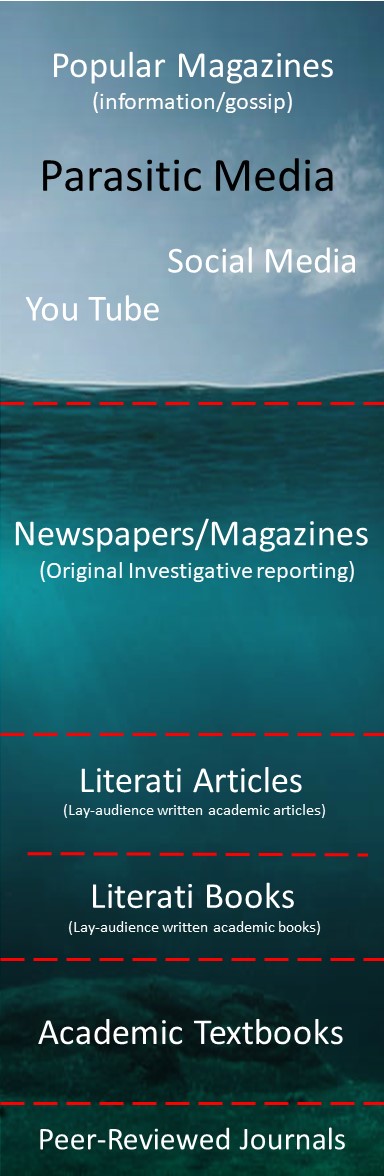
Read and Write
- Find/read a literati article (see lists below)
- Write 50-word summaries of the main idea for each article (not necessarily the main topic)
- AT THE MEETING: Discuss the central idea in the article you found
Keeping track
- Use bookmarks in a browser
- Bookmark any page you land on.
- make sure the name being saved in the book marks is a word you would remember that relates to the article
- Use a note app
- Write some notes about an article
- Copy paste the url into the notes
- I use Lite Writer but there are many free note apps; Litewriter logo looks like this:

Finding Sources
Literati Discussions
- Aeon
- Pysche Aeon's Sister Site
- Big Think
- Arts & Letters Daily (If on a phone, click on the Alternate View to see the list of sources A&L pulls from; Or, see below for part of that list from ALDaily)
- Science Alert
Videos
- While videos can be useful, the person in the video and/or the producer of the video must be legitimized.
- Track down the person or organization.
- Just because a lot of people have viewed, liked, or bought a source does not ever mean the source is legitimate.
- Find a textual source for the idea in the video.
- Use the textual source not the video
Google Scholar
- Often, results on Google scholar are paywalled
- If paywalled, use the article name in EFSC's databases to see if the article is available
- If not available, email the author directly. Author's of academic papers can freely give away their published papers
- Or, check Research Gate. If it's pon Research Gate, I am a member and can request a copy from the author.
- Once your name is listed in the PCA schedule as a presenter, you too can become a member of Research Gate (it's free!)
EFSC databases
- Login to MyEFSC
- Select the Library icon
- Enter search term or article name in the search box
Partial list from Aldaily.com
- Aeon
- American Conservative
- American Interest
- American Journal Rev
- American Prospect
- American Review
- American Scholar
- American Scientist
- American Spectator
- Arion
- Armed Forces Journal
- Art News
- Artforum
- Atlantic Monthly
- Atlas Obscura
- Big Questions
- Boston Globe Ideas
- Boston Review
- Cabinet
- Chronicle Review
- City Journal
- Columbia Journal Rev
- Commentary
- Common-place
- Commonweal
- Current Affairs
- Democracy
- Der Spiegel
- Discover
- Dissent
- Economic Principals
- Edge
- Electric Literature
- Eurozine
- Evolutionary Psych
- First Things
- Forbes
- Foreign Affairs
- Foreign Policy
- Fortnightly Review
- Globalist
- Guernica Magazine
- Harper's
- Harvard Magazine
- Hedgehog Review
- History Today
- Hoover Digest
- Hudson Review
- Humanities
- In These Times
- Independent Review
- Intelligent Life
- Jacobin
- JSTOR Daily
- King's Review
- Lambda Literary Review
- Lapham's Quarterly
- Le Monde Diplo
- Logos
- Maclean's
- MIT tech review
- Mosaic
- Mother Jones
- Ms. Magazine
- n+1
- National Affairs
- National Interest
- National Journal
- National Review
- Nautilus
- New Atlantis
- New Criterion
- New English Review
- New Left Review
- New Republic
- New Scientist
- New Statesman
- New York Magazine
- New York Observer
- New Yorker
- Newsweek
- NY Times Magazine
- Open Democracy
- Pacific Standard
- Parameters
- Paris Review
- Philosophers? Mag
- Philosophy & Literature
- Philosophy Now
- Poetry
- Poets & Writers
- Policy
- Project Syndicate
- Prospect
- Psychology Today
- Public Domain Review
- Reason
- Salon
- Scientific American
- Seed
- Skeptical Inquirer
- Slate
- Smart Set
- Smithsonian Magazine
- Spiked-Online
- Standpoint
- Technology Review
- The American
- The Baffler
- The Daily Beast
- The Economist
- The European
- The Humanist
- The Millions
- The Nation
- The New Inquiry
- The Outline
- The Point
- The Progressive
- The Spectator
- The Walrus
- The White Review
- Threepenny Review
- Tikkun
- Time Magazine
- US News
- Utne Reader
- Village Voice
- Washington Monthly
- Weekly Standard
- Wilson Quarterly
- Wired
- World Affairs
- Yale Review